
Support article
How to block an email address in cPanel
Learn how to block senders and domains from Spam Filters in cPanel to reduce unwanted email in your hosting account.
Introduction
If unwanted messages keep arriving from the same address or domain, you can block them in cPanel by using the Spam Filters blacklist.
This is useful for reducing repetitive spam, abusive senders or clearly unwanted mail.
Steps to block a sender
1. Sign in to cPanel
Log in to your hosting control panel with your username and password.
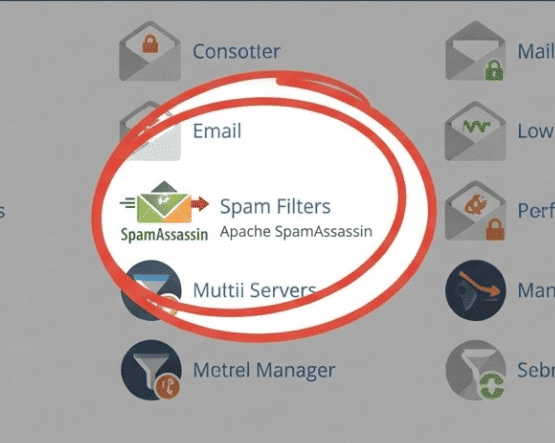
2. Open Spam Filters
Inside the email section, click Spam Filters.
3. Make sure the filter is active
Turn on Process New Emails and Mark them as Spam if it is not already enabled.
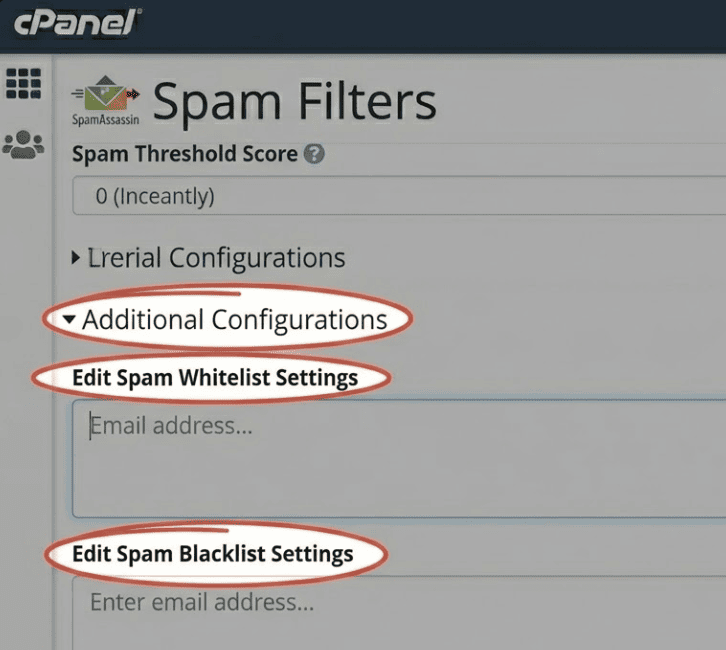
4. Open Additional Configurations
Look for the advanced configuration area to reveal whitelist and blacklist options.
5. Edit the blacklist
Open Edit Spam Blacklist Settings.
6. Add the address or domain
You can block:
- One specific address:
spam@example.com - A whole domain:
*@example.com
Save the changes to apply the rule.
When it makes sense to block a full domain
Blocking an entire domain can be useful if everything coming from that domain is unwanted, but it should be used carefully.
If there is any chance you may receive valid email from that domain, it is better to block only the exact address.
Useful tips
-
Block one exact address first
This is the most precise way to avoid false positives.
-
Do not confuse blacklist with instant deletion
The blacklist helps mark those messages as spam. Automatic deletion depends on other settings.
-
Check for a conflicting whitelist
If the same sender is allowed somewhere else, the result may not be what you expect.
-
Combine it with additional filters
If the spam keeps changing sender addresses, rules based on subject or domain may work better alongside the blacklist.
Frequently asked questions
Can I block all email from one domain
Yes, by using *@domain.com.
Can I unblock it later
Yes. Just return to the blacklist settings and remove the entry.
Does this automatically delete the messages
Not always. It marks them as spam first, and after that the outcome depends on your overall filtering setup.
Conclusion
Blocking an email address in cPanel is a simple way to reduce noise in your inbox.
If you combine it with a good spam score, a whitelist for trusted senders and well-planned filters, the result is usually much better.